


Sunday, 8 February 2015
Saturday, 7 February 2015
Paytm + Indiatimes Loot: Pay ₹10 Get ₹20 Cashback [OOS NOW]
Indiatimes is an online shopping portal. With Paytm they are giving away free Rs. 20 cashback on Paytm wallet by paying Rs. 10 from Paytm wallet. Shopping Indiatimes With PayTm is Giving Some Jawdropping Offers. You will Get Rs 20 Cashback if You Pay Rs 10 With PayTm wallet.So What are you waiting for Go Ahead Grab this Deal.

How to Get Rs 20 Cashback:
- Go to this link - http://bit.ly/indiatimesloot
- Click on Buy Now & proceed to checkout.
- Enter your login details & continue.
- Choose Paytm Wallet as your payment method on checkout and click pay now.

Important Note:
1. If it shows out of stock then again click on Paytm and Pay now.
2. If it shows that it cannot be shipped then use this pin code in address - 110001
- Log in or Sign Up on the Paytm website.
- Complete payment!
- Wait for cashback amount to be automatically credited to your Paytm wallet.
- Cashback will be automatically credited in your Paytm wallet within 15 minutes.
Note: You can do it total of 1 time [for previously used account also] from same account. :)
Proof:

Terms & Conditions:
- Limited units on sale.
- Amount will be automatically credited in your Paytm wallet within 24 hours.
- Valid for both existing & new users.
- Indiatimes Shopping reserves right to close this offer any time.
- In case of more than 1 order per customer, all orders other than first order from single customer will be cancelled.
- The refund of the same will be done within 72 Hours by Indiatimes Shopping.
- Any queries related to this Cashback Offer will be handled by Paytm support only.
- Kindly email at care@paytm.com or call 1800-1800-1234.
Friday, 6 February 2015
Convert 2GB memory card into 4GB

Convert 2GB Memory Card Into 4GB
2 Memory Card Tricks, Tricks
How To Increase Memory Card Space
Download .
Endowment Selling
Purchase Structured Settlements
Memory Card Storage become one of the great problem nowadays because of to much data. Everything become digital like our important documents, books and many more so now people need more storage space for their uses devices but how to increase their existing space this can be solved with the help of Memory Card but what we do if our data increasing day by day? Have we bought new Memory Card everyday? Is such a difficult thing. So what a best way in this way? Isn't we increase our Memory Storage?
Yes! Now you can easily increase your Memory Card Storage Space with the help of below mentioned method. This method works mostly on all SD cards or memory cards. If you have 1 or 2 GB card then you have to try to increase internal space of your memory card or SD card. Most of you maybe thinking that it is impossible and this is just joke, but i make you sure its not joke. Below method really works and there is a script that makes your Memory card internal space to 4 GB. This is such a awesome trick and it is tested by many users, you just run a script, enter your Memory Card's Name, its letter (commonly it is 'E' but you may have 'A', 'S' or whatever you want). This trick is very helpful and important for those who have 1 GB or 2 GB cards and they cannot buy 4 GB cards for some reasons. Now You will come to know how to increase internal size of your SDCARD/Memory Card. Most important it works only on some memory cards and specially on 1 GB or 2 GB internal storage cards and if you will try to increase your android's internal memory by below method then you can brick your Android's Internal Card or Memory Card which may next time never work. So, please try only on your SD cards and memory cards.
how to convert 2 GB memory card to 4 GB?
Mesothelioma Lawyers San Diego
What you need?
•1 GB or 2 GB Memory/SD card
•Increase Internal Space of Memory Card Toolkit Secured Loan Calculator
How to convert 1 or 2 GB Memory/SD card to 4GB?
1. First i recommend you to take a backup of Your Memory Card and its not a big deal :)
2. Extract 'increase internal space of memory Card Toolkit' which you have downloaded.
3. Now insert your 1 GB or 2 GB Memory Card/SD card in your computer but 1st take backup.
4. After taking complete backed up of your Card then open Drive Increaser.bat file from extracted folder.
Convert 2GB Memory Card Into 4GB
5. After the script will open, it will ask you for name which you want to give your SD/Memory Card. like me entered 'Sama' and after entering name, hit enter.
6. Now, you have to enter your Drive's letter and if you don't know your Memory Card/SD card's letter, then goto My Computer. Here you will see your C drive along with many drives and you will also find your Memory Card/SD card's, So see its letter, for example because it very important to be careful while entering your drive name. Like My drive's name is G:
7. Now, again enter your drive name. Once again be careful while entering drive name.
8. Now, wait............because the script will do the rest of work it self. You will not wait more because it mostly complete its work within 2-10 minutes or maybe more.
9. when its done then see your Memory Card/SD card internal space and if it is 4 GB then you have good luck :) and in the same way if your Memory Card/SD card's internal storage have not increased then you are having bad luck :(
If it increased then now, you have converted your Memory Card/SD card's internal storage and now you can restore the backup that you have taken.
So now you can store files upto 3 GB (4 GB does not means full 4GB, even 8 GB pen drives or memory cards have space upto 7 GB+). If you have good Luck mean have increased space then i am sure you are so happy and if you are happy then Please share with your friends they also Convert 2GB Memory Card
Monday, 2 February 2015
How to Increase the Internet Speed In 3G Netsetter
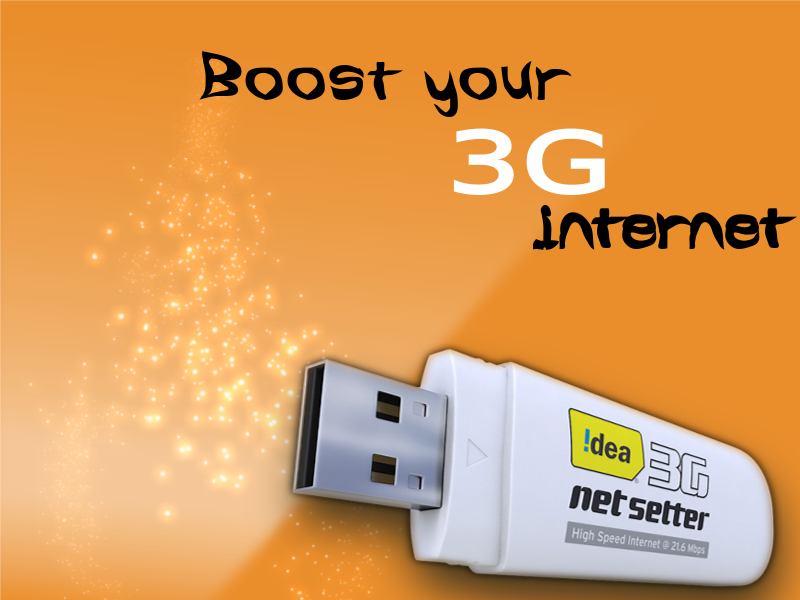
Modern technology has helped us in a lot of ways. it has made our day-to-day life a lot easier by making everything quite easy to access. Consider the internet as an example; earlier we needed telephone cables and stuff to access the internet. But now all we need now is a USB device popularly known as a 'net-setter'.
Through this article you will learn how to boost your 3-G net-setter to increase your internet speed. This is a very easy step-by-step method that you can easily perform so that you get better results from your 3-G net-setter.
Also Read:
The steps are as follows( the steps are performed on Windows 7 32 bit Operating system):
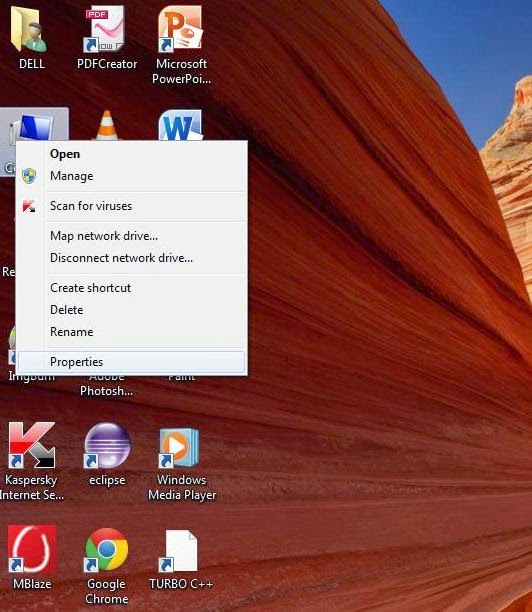
Right click on the Computer icon on desktop (or from Start menu), and click on Properties.
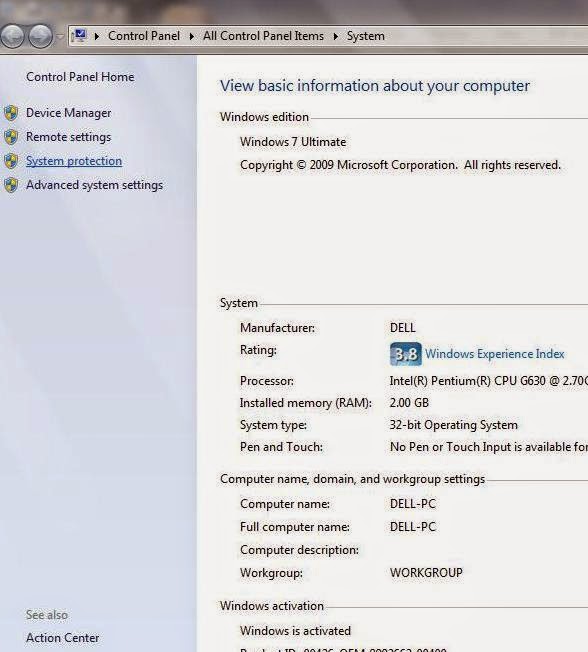
On the left pane of the window, you will see System Protection. Click on it.
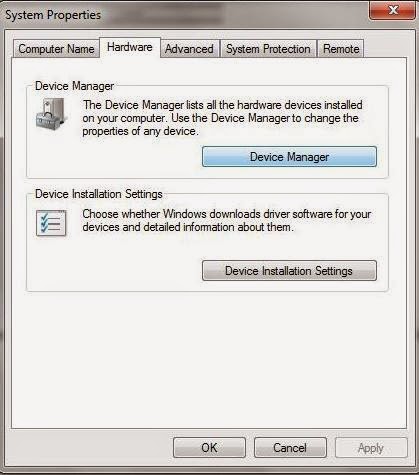
Select the Ports(COM & LPT) drop down list and you’ll see your net-setter communication ports. Double click the ports.
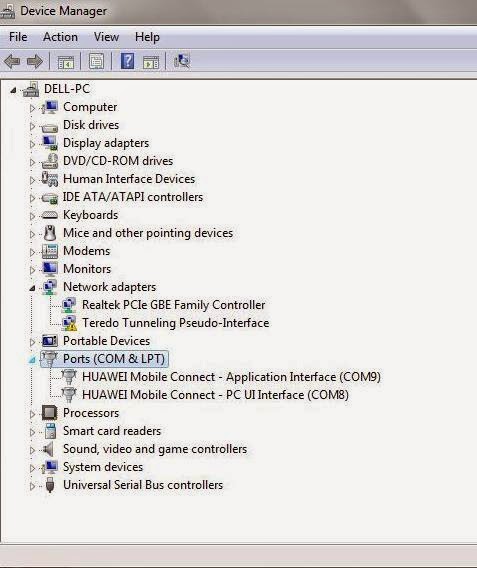
On the new window, select Port Settings tab and change the values to the following new ones.
Bits per second : 128000
Data bits : 8
Parity : None
Stop Bits : 1
Flow Control : Hardware
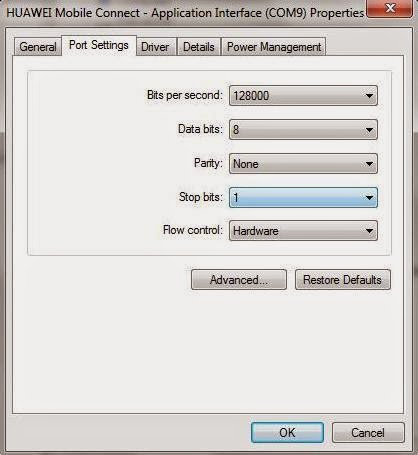
And finally click OK button.
Now enjoy your newly found internet speed.
Subscribe to:
Posts (Atom)